Seiden Group
Modern Development & Open Source for IBM i
  • Link to LinkedIn
  • Link to Mail
  • Home
  • Seiden PHP+
    • Seiden PHP+
    • Install & Learn
    • SmartSupport
    • PHP Migrations & Upgrades
    • Success Stories
    • Free PHP Assessment
    • Documentation
    • What’s New (Changelog)
  • IBM i Services
    • Development
    • Training & Mentoring
    • Open Source Setup & Upgrades
    • SSL/TLS Install & Learn
    • Performance
  • Support
    • Open Source & PHP
    • VS Code for i
    • Developer Support
    • Support Success Stories
  • VS Code for i
    • Support
    • Training
    • Code for i Resource Guide
    • Getting Started Videos
    • Code for IBM i Fridays
  • Free Stuff
    • IBM i Strategy & Tips
    • PHP Upgrade Assessment
    • CNX Valence Assessment
    • VS Code for IBM i Resources
    • Code for IBM i Fridays
    • QCachegrind Download
    • PHP Toolkit for IBM i Resources
    • Qshell on i Library
  • Blog
  • About
    • About Our Team
    • About Alan Seiden
    • Speakers & Sessions
    • In the News
  • Contact
  • 201.447.2437
  • Search
  • Menu Menu

Tag Archive for: SDA

Alan Seiden

Moving to IBM i 7.6? An SDA Alternative with VS Code and IBM Bob
October 9, 2026/0 Comments/in VS Code for i /by Alan Seiden


Display File DDS Edit Logo
Have you been holding off on IBM i 7.6 because your developers need Screen Design Aid (SDA)? IBM removed SDA in 7.6, but there is another way to maintain your DDS display files.

Christian Larsen’s free and open source Display File DDS Edit extension lets you visually edit and preview display files in VS Code and IBM Bob. For shops that depend on SDA, the extension can remove an obstacle to upgrading.

Christian joined us at our September 25, 2026, Code for i Fridays meeting to demonstrate the editor and answer questions. We have posted the video of Christian’s demonstration, with his permission.

Working with your display files

As you edit DDS, the extension shows a preview of your screen. You can drag fields into position, add fields and constants, and see how indicator settings affect the display.
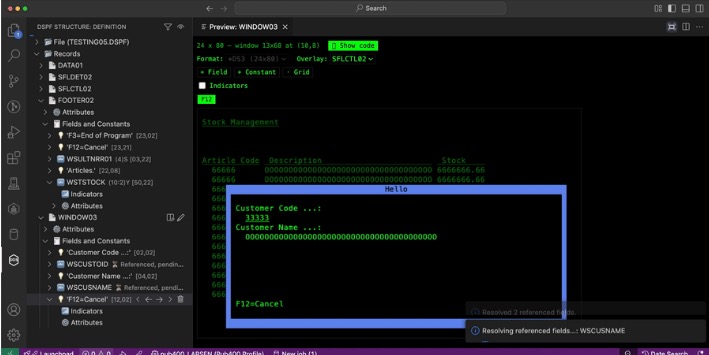
Screen Preview

Christian’s demonstration covers tasks familiar to SDA users, including:

  • Moving and adding fields
  • Working with indicators and function keys
  • Resolving referenced fields
  • Overlaying records
  • Designing windows
  • Supporting multiple display sizes

Preparing for IBM i 7.6

If SDA is on your list of reasons to stay on an older release, take a look at VS Code, Code for i, and this extension. You can keep maintaining your existing DDS screens using VS Code or IBM Bob.

Getting started

Install Display File DDS Edit from the Visual Studio Marketplace. In VS Code, open a DDS display file, and look for DSPF STRUCTURE in Explorer. From there, you can navigate the file and access editing options. The Marketplace page also links to documentation and a place to report issues or request enhancements.

Thank you to Christian for sharing his work and taking questions from the group.

For more demonstrations and discussions like this one, join us for Code for i Fridays. Bring a question, share something you’ve learned, or just listen. Sign up to receive meeting invitations and recording links.

https://www.seidengroup.com/wp-content/uploads/2017/03/SeidenLogo-180.png 0 0 Alan Seiden https://www.seidengroup.com/wp-content/uploads/2017/03/SeidenLogo-180.png Alan Seiden2026-10-09 10:53:552026-10-09 10:53:55Moving to IBM i 7.6? An SDA Alternative with VS Code and IBM Bob
SUBSCRIBE
Open Thinking
Monthly IBM i Strategy & Tips
  • This field is for validation purposes and should be left unchanged.

IBM i Development

  • RPG, COBOL, SQL, Node,
    PHP, Python, Valance, etc.
  • Modernization. Integration.
  • Web and API Solutions
  • Legacy Maintenance
    ...
LET'S GET IT DONE!

Recent Posts

  • Moving to IBM i 7.6? An SDA Alternative with VS Code and IBM Bob
  • What’s New with Mapepire Database Connector for IBM i
  • Do You Need IBM i Observability?
  • PHP 8.6 is Coming Soon to IBM i
  • Safer npm installation is on the way for Node.js (and all JavaScript)
  • Access Modern Security for IBM i and Connected Web Environments
  • IBM i: A Natural Platform for Agentic AI
  • PHP on IBM i in 2026: The Modernization Engine
  • Your “AS/400” Is a Modern IBM i Platform
  • MCP + AI for IBM i Teams (with a MongoDB example)

SEIDEN GROUP: Modern Development & Open Source for IBM i

Home   |   Seiden PHP+   |   IBM i Services  |   Support   |   VS Code for i   |   Free Stuff   |   Blog  |   Privacy Policy  |   Contact         201.447.2437

© 2026 Seiden Group, LLC
  • Link to LinkedIn
  • Link to Mail
Scroll to top Scroll to top Scroll to top