Seiden Group
Modern Development & Open Source for IBM i
  • Link to LinkedIn
  • Link to Mail
  • Home
  • Seiden PHP+
    • Seiden PHP+
    • Install & Learn
    • SmartSupport
    • PHP Migrations & Upgrades
    • Success Stories
    • Free PHP Assessment
    • Documentation
    • What’s New (Changelog)
  • IBM i Services
    • Development
    • Training & Mentoring
    • Open Source Setup & Upgrades
    • SSL/TLS Install & Learn
    • Performance
  • Support
    • Open Source & PHP
    • VS Code for i
    • Developer Support
    • Support Success Stories
  • VS Code for i
    • Support
    • Training
    • Code for i Resource Guide
    • Getting Started Videos
    • Code for IBM i Fridays
  • Free Stuff
    • IBM i Strategy & Tips
    • PHP Upgrade Assessment
    • CNX Valence Assessment
    • VS Code for IBM i Resources
    • Code for IBM i Fridays
    • QCachegrind Download
    • PHP Toolkit for IBM i Resources
    • Qshell on i Library
  • Blog
  • About
    • About Our Team
    • About Alan Seiden
    • Speakers & Sessions
    • In the News
  • Contact
  • 201.447.2437
  • Search
  • Menu Menu

Seiden Group Blog

What IBM i Users Should Check when Learning of an Open Source Security Vulnerability

February 28, 2024/0 Comments/in Open Source /by Alan Seiden

API & web security on IBM iA client asked about a vulnerability found in libwebp, which is used by PHP’s image-handling gd extension.

My first step was to find a reputable source for details. According to this trusted article about the vulnerability, the issue affected only libwebp versions 1.3.1 and earlier. I checked our own system and found we had a patched version from IBM, so we were safe. The client was, too.

Here is the procedure you can use for checking the version of this or any other open source package on IBM i.

How to check your package version

The easiest way is to use the Open Source Package Management window of Access Client Solutions (ACS). The link is at or near the bottom of the left-side menu:

ACS package management menu link

ACS Open Source Package Management link

After clicking the link and logging in, you should see a list of installed packages. To narrow your search to the component you want, select the View / Filter… menu option shown below:
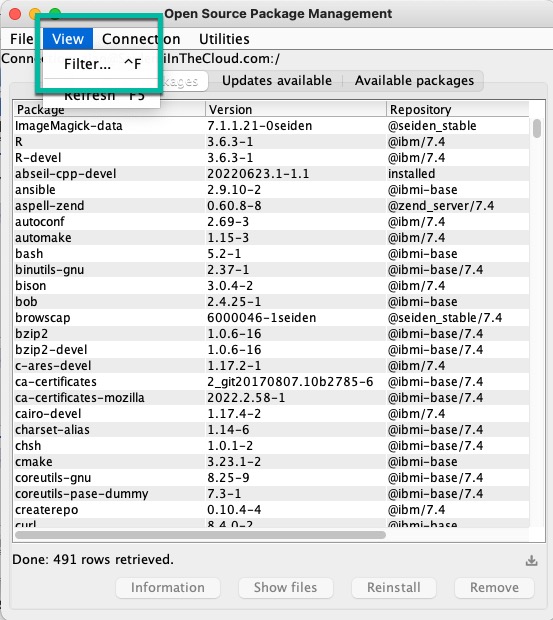
View filter in Open Source Package Management

View -> Filter…

Then type the package name you are looking for in the Package Filter input box that appears:

Filter prompt (libwebp)

Filter prompt (libwebp)

After clicking OK, you will see any matching packages:

Filtered list (libwebp)

Filtered list showing libwebp7 with version number

The list showed that the libwebp package was called libwebp7, and the version was 1.3.2-1, a higher number than the vulnerable 1.3.1 version. Our version was safely patched.

If I had needed to update libwebp7, I could have clicked on Updates available and looked for a newer version.

New IBM repositories

If you do not see new versions such as I showed above, check the third column of the list. If the third column does not show the repository names ibmi-base or ibmi-release, you will need to enable them to get the latest open source updates. Enable them by clicking the Available packages tab and installing the package ibmi-repos.

For more information on IBM’s new repositories, go to https://techchannel.com/SMB/08/2022/ibm-i-rpm-repositories.

Tags: IBMi, IBMiOSS, security
Share this entry
  • Share on Facebook
  • Share on X
  • Share on Pinterest
  • Share on LinkedIn
  • Share on Tumblr
  • Share on Reddit
  • Share by Mail
https://www.seidengroup.com/wp-content/uploads/2017/03/SeidenLogo-180.png 0 0 Alan Seiden https://www.seidengroup.com/wp-content/uploads/2017/03/SeidenLogo-180.png Alan Seiden2024-02-28 11:23:362024-02-28 11:23:36What IBM i Users Should Check when Learning of an Open Source Security Vulnerability
Alan Seiden

About Alan Seiden

Alan works to preserve your investment in IBM enterprise systems by designing and implementing modernization strategies that leverage your existing business logic.

With a passion ...Read More

0 replies

Leave a Reply

Want to join the discussion?
Feel free to contribute!

Leave a Reply Cancel reply

Your email address will not be published. Required fields are marked *

This site uses Akismet to reduce spam. Learn how your comment data is processed.

SUBSCRIBE
Open Thinking
Monthly IBM i Strategy & Tips
  • This field is for validation purposes and should be left unchanged.

IBM i Development

  • RPG, COBOL, SQL, Node,
    PHP, Python, Valance, etc.
  • Modernization. Integration.
  • Web and API Solutions
  • Legacy Maintenance
    ...
LET'S GET IT DONE!

Recent Posts

  • Moving to IBM i 7.6? An SDA Alternative with VS Code and IBM Bob
  • What’s New with Mapepire Database Connector for IBM i
  • Do You Need IBM i Observability?
  • PHP 8.6 is Coming Soon to IBM i
  • Safer npm installation is on the way for Node.js (and all JavaScript)
  • Access Modern Security for IBM i and Connected Web Environments
  • IBM i: A Natural Platform for Agentic AI
  • PHP on IBM i in 2026: The Modernization Engine
  • Your “AS/400” Is a Modern IBM i Platform
  • MCP + AI for IBM i Teams (with a MongoDB example)

SEIDEN GROUP: Modern Development & Open Source for IBM i

Home   |   Seiden PHP+   |   IBM i Services  |   Support   |   VS Code for i   |   Free Stuff   |   Blog  |   Privacy Policy  |   Contact         201.447.2437

© 2026 Seiden Group, LLC
  • Link to LinkedIn
  • Link to Mail
Link to: APCu Extension Added to Seiden PHP+ Link to: APCu Extension Added to Seiden PHP+ APCu Extension Added to Seiden PHP+ Link to: Node.js v20 and Other Updated Packages Require New IBM i Repositories Link to: Node.js v20 and Other Updated Packages Require New IBM i Repositories Node.js v20 and Other Updated Packages Require New IBM i Repositories
Scroll to top Scroll to top Scroll to top