PHP performance tip: disable unused extensions with Zend Server

UPDATE: As of 2020, we recommend using Seiden PHP on IBM i and LINUX for reliability, speed, and ease of maintenance.


Whenever I’m brought in to improve the performance of a PHP application, an easy change I make is to disable any PHP extensions that the application does not use. PHP extensions are code libraries written in C that add to PHP’s native functionality. Examples of popular extensions on IBM i are ibm_db2 and curl.

Boost performance by disabling unneeded extensions

I’ve noticed that Zend Server ships with most extensions enabled, presumably so that developers won’t have to see “extension not enabled” error messages. While the default configuration is fine as a starting point, developers should understand that each extension requires memory when loaded. When every bit of performance counts, it’s best to disable the unused extensions. Note: don’t disable anything till you read Several Extensions to Keep Enabled.

Managing PHP extensions

To manage extensions, Zend Server provides the “Server Setup / Extensions” tab. Each extension can be enabled or disabled with its “Turn on” or “Turn off” links. Changes do not take effect until the “Restart PHP” button is clicked.

Zend Server PHP extensions management page

Zend Server’s Extensions page where PHP extensions are managed

Storage location for extension settings

Zend Server stores extension settings in a set of .INI files, one file per extension. On IBM i, the files are located in /usr/local/ZendSvr/etc/conf.d. Before making large-scale changes, you may wish to back up this folder. Then, if you discover you were overzealous in disabling extensions, you can compare the contents of conf.d with your backup to find out where you went wrong.

Several extensions to keep enabled

In addition to whatever extensions are required by a given application, I’ve found that several extensions are required by Zend Server itself. Do not disable these. So far, I’ve found that Zend Server requires these extensions to be enabled:

  • ctype
  • iconv
  • json
  • pdo_mysql
  • simplexml (used by new open source toolkit)
  • zip

If you accidentally disable an extension required by Zend Server, which you’ll discover when Zend Server fails to start properly, you must re-enable the extension in the correct .INI file and then restart Zend Server from a command line or menu. On IBM i, the command is STRTCPSVR SERVER(*HTTP) RESTART(*HTTP) HTTPSVR(ZENDSVR).

More performance tips to come

I plan to write about more techniques to improve PHP application performance, particularly on IBM i, that I’ve found to be effective in my consulting experience. Performance is a critical part of user experience that developers should not ignore. In addition to this practical need for good performance, I can speak for myself, at least, in saying I feel great satisfaction when I can take a slow application (sometimes the victim of an underpowered server) and, step by step, help it run faster and faster, till the performance is at least acceptable and sometimes quite fast. More to come.

Zend Framework webinar this Wednesday

On March 9, 2011, I’ll present a free webinar about how to create a Zend Framework project on IBM i. The webinar is at 9am PST, 12pm EST. Sign up here: http://www.zend.com/en/company/news/event/790_webinar-your-first-zend-framework-project-on-ibm-i

Here’s the complete list of my upcoming talks.

Maximize PHP performance with Apache compression

Does your site run as quickly as it could? It’s worth your time to find out. Faster web sites sell more products, improve user satisfaction, and even rank higher in Google searches.

Note: This tip was written for IBM i but could be adapted for other platforms as well.

Compression adds speed

IBM’s Apache web server provides a way to speed up your pages. You can compress PHP output, javascript, style sheets, and other text-based content. The compressed output will automatically be decompressed and interpreted properly by all modern web browsers. My tests show a speed improvement of 10-50% from this easy technique.

How to enable compression in 3 steps

1. Edit your Apache configuration file, located at /www/myserver/conf/httpd.conf (replace myserver with your instance name. This is a simple text file, so you may choose from several editors: IBM’s HTTP Server Admin GUI at port 2001 (if *ADMIN is started), the WRKLNK/EDTF command, or your favorite text editor.

2. Add the following two directives to the httpd.conf’s main section:

3. Restart Apache via the HTTP Server Admin page or STRTCPSVR SERVER(*HTTP) RESTART(*HTTP) HTTPSVR(MYSERVER)

Measure the improvement

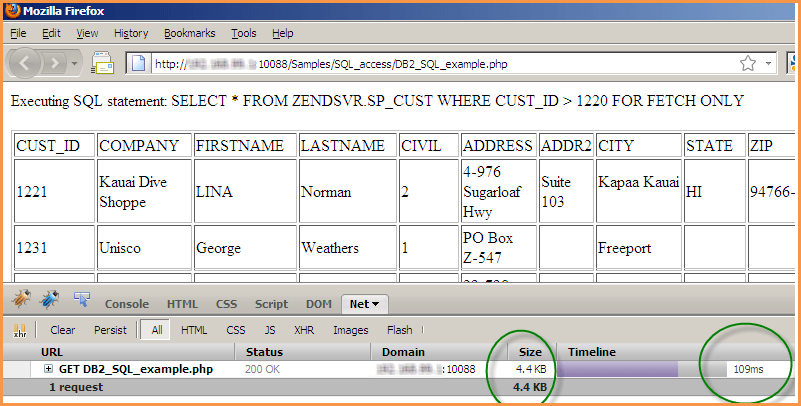
I ran before-and-after tests using a sample script included with Zend Server for IBM i: http://your-server:10088/Samples/SQL_access/DB2_SQL_example.php.

Before compression: 31kb, loaded in 250ms (milliseconds). See the Firebug report below (Firebug is an optional add-on for Firefox and is not required.)

Zend Server output without compression

Without compression, this page was 31kb and loaded in 250ms

After compression: 4.4kb; loaded in 109ms. That’s only 14% of the size and 50% of the time! See the screen shot below.

after compression: only 4.4kb and loaded in 109ms

after compression: only 4.4kb and loaded in 109ms

I highly recommend that you give output compression a try. Your HTTP Server for IBM i pages will fly!

For more information on browser output compression, see: http://httpd.apache.org/docs/2.0/mod/mod_deflate.html

A simple security measure

A reader recently asked me this security question:

If a user enters:
http://<my_ip>/<mydirectory>
instead of
http://<my_ip>/<mydirectory>/script.php

They get a listing of all scripts/files in that directory and they can then select and execute/run those scripts.

This is a real concern for us, any suggestions?

The solution is to turn off directory browsing in your Apache configuration. To do this, make sure your Apache configuration file (probably httpd.conf or .htaccess) includes this directive:

Options -Indexes

Note that this directive merely prevents people from discovering the names of your files. Users who already know your file names can still access them. But Options -Indexes provides an important layer of security, preventing mischief from casual users who might otherwise stumble onto your file names by accident or design.

More information: http://httpd.apache.org/docs/2.2/mod/core.html#options

Differences Between Zend Core and Zend Server on IBM i

UPDATE: As of 2020, we recommend using Seiden PHP on IBM i and LINUX for reliability, speed, and ease of maintenance.


Zend Core
Zend Server
Installation folder
/usr/local/zend/core
/usr/local/zendsvr
PHP.INI
/usr/local/zend/core/etc
/usr/local/zendsvr/etc
Web server root(s)
/www/zendcore,
/usr/local/zend/apache2
/www/zendsvr
Document root
/www/zendcore/htdocs
/www/zendsvr/htdocs
Zend Framework
/usr/local/Zend/ZendFramework
/usr/local/zendsvr/share/ZendFramework
PHP binaries folder *
* where php and php-cli reside
/usr/local/zend/core/bin
/usr/local/zendsvr/bin
PHP Log files
/usr/local/zend/core/logs
/usr/local/zendsvr/
var/log
Web user profile (assign authority to it)
NOBODY
QTMHHTTP
Default HTTP Port
:89
:10088
Admin Interface URL
http://yourIBMi:89/ZendCore/
http://yourIBMi:10088/ZendServer/
Menu (5250)
GO ZENDCORE/ZCMENU
GO ZENDSVR/ZSMENU

If the new HTTP port of 10088 seems hard to remember, you can change it to something that’s easier to work with, such as the standard HTTP port of 80. To do that, edit /www/zendsvr/conf/httpd.conf and change Listen *:10088 to Listen *:80 or whatever you want. (Of course, first ensure that no other service is running on that IP/Port combination.)

Zend Server for IBM i Is Here

UPDATE: As of 2020, we recommend using Seiden PHP on IBM i and LINUX for reliability, speed, and ease of maintenance.


Zend and IBM have announced an updated, streamlined version of their PHP package for IBM i, called Zend Server. I’ve been using the beta for a while but last week read an announcement showing it’s ready for general use. It combines the best of Zend Core and Zend Platform in one package.

To get Zend Server, go to the Zend Server for IBM i page and click the green “Free Download” button. This will give you the “Community Edition (CE)” version, the free version that handles all the basics for running PHP on IBM i. It even comes with a year of free online support.

If you want to  upgrade to the non-CE version (it doesn’t have its own name), which gives you more debugging and tracing tools, as well as Job Queue functionality and more support, you can buy a license. Write to me if you need help or want to buy a license for the non-CE version.

Class ‘Zend_Db_Table’ not found

An up-to-date PHP installation is critical for security and performance. Request your complimentary PHP Upgrade Assessment with Alan.


New developers sometimes struggle with putting all of Zend Framework’s pieces together. This week someone asked me how to resolve the error:

Fatal error: Class ‘Zend_Db_Table’ not found.

The answer: he needs to “require” the file containing the Zend_Db_Table class, like so:

or (my preference) use the autoloader:

ZF isn’t complicated if you know the few things you MUST use. The autoloader is one of them.

If you need help getting started with Zend Framework, contact me about Zend Framework mentoring, training, or troubleshooting.

Our Zend Framework-based Site Honored by IBM/COMMON

UPDATE: As of 2020, we recommend using Seiden PHP on IBM i and LINUX for reliability, speed, and ease of maintenance.


We won! IBM has recognized my use of PHP and Zend Framework, and our entire team’s RPG/DB2 and design work, by naming our web solution the IBM i’s most innovative of 2009.

At IBM’s 2009 COMMON conference, IBM awarded the Power Systems Innovation Award for Best Web Solution for eBiz@ABG. The site, developed with my colleagues at  Strategic Business Systems, Inc., was created for New Jersey’s largest wine and spirits wholesaler, Allied Beverage Group.

The system offers product ordering, live inventory levels and pricing, and a full-text search of Allied’s large product catalog. The application was built with Zend Framework (the leading PHP framework) and runs entirely on Allied’s IBM i, leveraging Allied’s db2 database and time-tested RPG logic.

The site is password-protected, so unfortunately I can’t link to it here.

eBiz@ABG is one of the first sites to be built with Zend Framework on IBM i (System i, i5, iSeries, AS/400). It was a true collaboration with Allied, made easier because we all spoke the language of “i.” What’s more, by using large chunks of Allied’s existing RPG code that already handled the complex business logic, we saved time and avoided reinventing the wheel.

Zend Framework worked so well that I committed to mastering it and teaching the community about it. (ZF has a learning curve, but after that curve is mastered, ZF speeds development and offers easy maintenance and growth.) I earned my Zend Framework certification in August 2008, becoming one of the first 50 worldwide to do so and the first ZF-certified “i” professional. Since then, I’ve gone on to be a ZF/i mentor for other development teams, and have become a public speaker, sharing my PHP/ZF/i roadmap at conferences.

Thanks to Allied for the opportunity to collaborate on a great project; thanks to Strategic Business Systems for the support; and thanks to IBM for the award.

Why Use a PHP Framework?

At last night’s NY-PHP gathering, a fellow PHP’er and I discussed PHP frameworks. I told her I was developing an e-commerce site using Zend Framework. She replied that she’d been considering frameworks, especially Cake and Symfony, “but I’m not sure I need a framework at all. I write my own SQL; my apps work fine. What would a framework do for me?”

Setting aside the differences between PHP frameworks, I’m aware of at least 4 reasons to use them:

  1. Modular design: A home-grown application, with its ad hoc growth, can become a tangled mess that’s hard to change or enhance. Most mainstream frameworks provide a modular design that makes it easier to modify or add components.
  2. Flexible components: Sure, you can write your own authorization class in PHP, but why reinvent the wheel? The framework will provide an integrated component that handles not only your current needs, but requirements that you haven’t yet encountered (but that the framework’s community has). With a framework, chances are that you won’t have to redesign your authorization system when the users ask for something new.
  3. Best practices: As you use the framework, you’ll begin to absorb the practices and (we hope) good habits of the framework’s creators.
  4. New capabilities: Frameworks regularly add functionality to help developers implement new technology. These days, common enhancements involve AJAX and connections to the APIs of popular web service providers.

Developers may understandably wonder if mastering a framework is worth the learning curve. In my opinion, the effort to learn a framework will be repaid with applications that are well structured, flexible, and easily maintained.

Brand your site with a favicon

Favicons are those eye-catching little pictures that appear in your web browser’s address bar, favorites list (hence the name favicon, short for “favorites icon”), and, with modern tabbed browsers, on tabs.

Instantly recognizable when designed well, favicons represent the brand identity of sites that use them.

Examples

Wikipedia uses the “W” from its logo:
Wikipedia’s favicon

Digg’s favicon represents a person holding a shovel, an image that seems to have been created especially for the favicon:
Digg’s favicon

Usability in a tabbed, multitasking world

Tabbed browsers, such as Firefox and Internet Explorer 7, can show many page-tabs at once, squishing a site’s descriptive text.
Below are examples of tabs without favicons. What sites are they? I don’t know.
FireFox tabs without favicons

These have favicons. At a glance I see a seated robed figure (meditation site), a stylized “Ti” that I recognize as my private TikiWiki site, and a picture of me, which (if I can stop admiring its beauty for a moment), I know represents my blog.
FireFox tabs with favicons

Create your own mini work of art

Favicons are ordinary graphics, generally 16×16 pixels in size, named favicon.ico. How to make them? I found an easy method that even non-artists can use.

The free site Favicon Generator allows anyone to convert a normal-sized graphic into a favicon. Instructions:

  1. Go to Favicon Generator.
  2. Click the “Browse…” button to select an image from your computer’s hard drive.
  3. Click “Create Favicon.”
  4. When it’s ready, click the “Download the generated favicon” link to get the files.
  5. Download the zip file and extract favicon.ico to your computer. Then transfer that file, via FTP or your preferred method, to your website’s root folder (often /public_html or /www).
  6. View your website with its new addition! (You might have to press the refresh button to make the favicon appear.)

Show your art

If this article inspired you to create a favicon, please add a comment here with the link to your newly enhanced site.



