

Maximize PHP performance with Apache compression
Does your site run as quickly as it could? It’s worth your time to find out. Faster web sites sell more products, improve user satisfaction, and even rank higher in Google searches.
Note: This tip was written for IBM i but could be adapted for other platforms as well.
Compression adds speed
IBM’s Apache web server provides a way to speed up your pages. You can compress PHP output, javascript, style sheets, and other text-based content. The compressed output will automatically be decompressed and interpreted properly by all modern web browsers. My tests show a speed improvement of 10-50% from this easy technique.
How to enable compression in 3 steps
1. Edit your Apache configuration file, located at /www/myserver/conf/httpd.conf (replace myserver with your instance name. This is a simple text file, so you may choose from several editors: IBM’s HTTP Server Admin GUI at port 2001 (if *ADMIN is started), the WRKLNK/EDTF command, or your favorite text editor.
2. Add the following two directives to the httpd.conf’s main section:
|
1 2 3 4 5 |
# Load IBM i's module that performs compression LoadModule deflate_module /QSYS.LIB/QHTTPSVR.LIB/QZSRCORE.SRVPGM # Specify what to compress (example: php, json, css, javascript, static html) AddOutputFilterByType DEFLATE application/x-httpd-php application/json text/css application/x-javascript application/javascript text/html |
3. Restart Apache via the HTTP Server Admin page or STRTCPSVR SERVER(*HTTP) RESTART(*HTTP) HTTPSVR(MYSERVER)
Measure the improvement
I ran before-and-after tests using a sample script included with Zend Server for IBM i: http://your-server:10088/Samples/SQL_access/DB2_SQL_example.php.
Before compression: 31kb, loaded in 250ms (milliseconds). See the Firebug report below (Firebug is an optional add-on for Firefox and is not required.)

Without compression, this page was 31kb and loaded in 250ms
After compression: 4.4kb; loaded in 109ms. That’s only 14% of the size and 50% of the time! See the screen shot below.
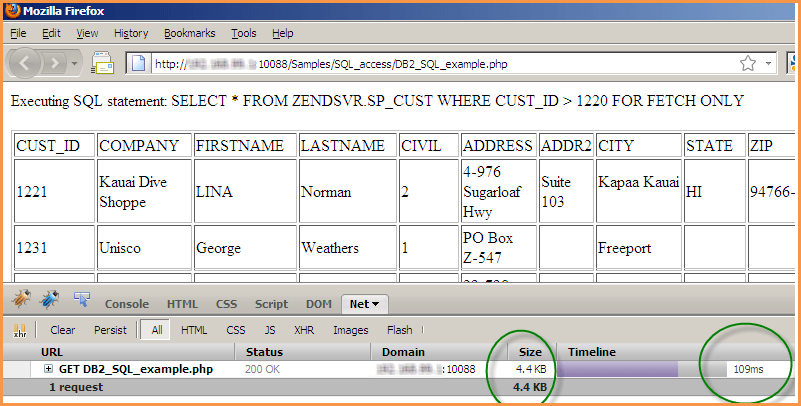
after compression: only 4.4kb and loaded in 109ms
I highly recommend that you give output compression a try. Your HTTP Server for IBM i pages will fly!
For more information on browser output compression, see: http://httpd.apache.org/docs/2.0/mod/mod_deflate.html